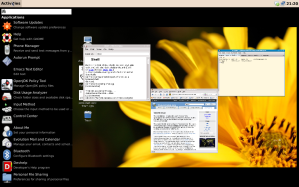
Gnome Shell recently introduced a new notification system. Sadly it seems like GNOME Shell is going to duplicate a lot of the efforts from Canonical. Besides the notification system the application indicators also have similarities.
It looks like the Notify OSD of GNOME Shell is named the Message Tray. You can see a short screencast demo here: http://www.gnome.org/~mccann/shell/mockups/20090630-demo
I was truly hoping that Gnome would continue the fantastic work Canonical is doing rather than starting over. The question still remains, what experience will Ubuntu 10.10 ship?
Source:
http://www.gnome.org/~mccann/shell/design/GNOME_Shell-20091114.pdf
Showing posts with label gnome 3. Show all posts
Nov 10, 2009
GNOME 3.0 in September 2010

After collecting some feedback, the GNOME Release Team has finally decided on the release date for GNOME 3.0: It will be September 2010.
To take a look again at the GNOME 3 plan that was released in April 2009: Click here.
This may come as a disappointment to those that have been very much looking forward to major improvements on the GNOME desktop, but a six-month set-back won't be too bad if it will lead to a better quality release (especially after judging the initial KDE 4.0 release). Additionally, Canonical for instance was not planning on shipping GNOME 3.0 until Ubuntu 10.10 due to Ubuntu 10.04 being their Long-Term Support release and not wanting to ship a potentially buggy desktop, so many desktop Linux users would not even have encountered the 3.0 release until October of 2010.
New module decisions for GNOME 2.30 were also made of course.
On the Gnome devel-announce-list, Vincent Untz wrote:
A wise decision and I'm sure the Gnome 3 release will be fantastic ones it arrives.GNOME 3.0 will be released in September 2010, and in the meantime, we will release GNOME 2.30 in March 2010, continuing our long-standing tradition of six-months releases. Thanks to the input from the community, we were able to draw a clear picture of where we stand today and where we will be next March. As mentioned in the GNOME 3.0 planning document [1], the release date for 3.0 was not set in stone: while we're using a strict schedule that allows us to release GNOME every six months, GNOME is above all using quality-based release engineering. That's why our community wants GNOME 3.0 to be fully working for users and why we believe September is more appropriate. Note that this release date for 3.0 doesn't mean that 2.30 will be less stable than usual. On the contrary, this will help us integrate the changes that are ready for 2.30, while leaving the parts that are still rough on the edges outside of GNOME, as used daily by our users, until after 2.30 is out. This will solidify both our 2.30 and 3.0 releases. The idea of doing GNOME 3.0 was first seriously discussed in 2008, before focus areas were defined in 2009, alongside a plan to reach 3.0. Those focus areas include revamping the user experience, streamlining the platform and improving the promotion of GNOME. Compared to GNOME 3.0, GNOME 2.30 will see the iterative improvements and bug fixes that people have now come to expect from our 2.x branch, in addition to some preliminary work needed for GNOME 3.0. The GNOME 3.0 planning document was answered by the community with a tremendous amount of work, with various teams taking the opportunity to set their own goals for 3.0. Such goals range from modernizing part of our stack to proposing new UI models for our desktop: those broad changes show our ambition to always offer the best to developers and users, and this make our path to GNOME 3.0 most exciting! Let's make 2010 a fantastic year for GNOME! Vincent [1] http://live.gnome.org/ThreePointZero/Plan
If you want to test the developer preview of Gnome-Shell, you can easily install it in Karmic Koala via Synaptic.
Source: Andre Klapper (andre) and phoronix.com
Jul 13, 2009
Shuttleworth about GNOME 3.0

Derstandard.at has an interesting article titled "Shuttleworth about GNOME 3.0 - What's good, what's missing, what needs work"
Sees good possibility of having a common meta-release cycle with Debian - Not sure if GNOME3 will make the next LTS. A good read... here!
Source: http://derstandard.at/fs/1246541995003/Interview-Shuttleworth-about-GNOME-30---Whats-good-whats-missing-what-needs-work
Apr 23, 2009
GnomeShell and Complex Design Ideas
You've probably already heard about GnomeShell, which redefines user interactions with the GNOME desktop. The project is still in early stages of development. The plan is to have it be an optional feature in GNOME 2.28, and to replace the existing components for GNOME 3.0.
On the designer playground site you can find a list of descriptions of design ideas with links to the mockups or write-ups. If you're into usability, GUI design or just curious, surf by the http://live.gnome.org/GnomeShell/DesignerPlayground
On the site you'll find images, write-ups, videos and even an interactive mockup.
The image below is a mockup made by Máirín Duffy for the Navigating Applications Menu
On the designer playground site you can find a list of descriptions of design ideas with links to the mockups or write-ups. If you're into usability, GUI design or just curious, surf by the http://live.gnome.org/GnomeShell/DesignerPlayground
On the site you'll find images, write-ups, videos and even an interactive mockup.
Labels:
design,
gnome 3,
gnome shell,
mockup,
usability,
user experience
Nov 29, 2008
Installing GNOME Shell in Ubuntu Intrepid
Siegfried Gevatter did a blog post on how to build and test the development version of the GNOME shell. Luckily for us, Siegfried decided to write down all the instructions on how to build it so that others have it easier than he did.
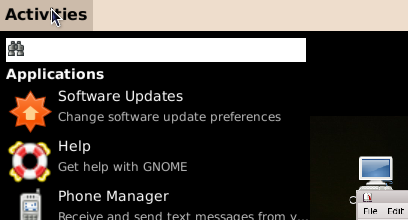
Initial build of GNOME Shell
1. Download gnome-shell-build-setup.sh (wget http://svn.gnome.org/svn/gnome-shell/trunk/tools/build/gnome-shell-build-setup.sh) and run it (bash gnome-shell-build-setup.sh). This will download jhbuild into ~/Source and build it (the executables will end up in ~/bin).
2. Install the necessary build dependencies for gnome-shell (and its bundled dependencies): sudo apt-get install build-essential automake gnome-common flex bison curl git-core subversion gtk-doc-tools mesa-common-dev xulrunner-1.9-dev libdbus-glib-1-dev libffi-dev libgconf2-dev libgtk2.0-dev libgl1-mesa-dev libgstreamer-plugins-base0.10-dev python2.5-dev.
3. Download and build gnome-shell (and its bundled dependencies) by running ~/bin/jhbuild build. All files are placed into ~/gnome-shell.
Running it
1. Run ~/bin/jhbuild shell to enter a subshell, and then follow the remaining steps inside it.
2. Go into the appropriate directory, with: cd ~/gnome-shell/source/gnome-shell/scripts.
3. Start gnome-shell, either inside a window by using Xephyr: ./start-in-Xephyr (you’ll need to have xserver-xephyr installed for this to work, or replacing gnome-panel and metacity in your “real” desktop: ./start-replace.
Updating it
Execute ~/bin/jhbuild build –force –clean. The two arguments, “–force” and “–clean”, are used to rebuild everything, even if it didn’t change. You can usually omit them, but in some cases not doing this may lead to GNOME Shell failing to start.
You can also rebuild only a certain element (with this I mean either gnome-shell or one of its bundled dependencies, namely clutter, gjs, gobject-introspection, gir-repository or metacity-clutter) by using ~/bin/jhbuild buildone –clean.
Problem: My computer hangs if I run it
Like the new Compiz version in Intrepid, gnome-shell uses GL_EXT_texture_to_pixmap, which is broken for some old Intel cards and causes the computer to hang if start-replace is used. You can easily disable this, though, by setting the GNOME_SHELL_DISABLE_TFP environment variable (the name of this variable may change in the future).
So, just run echo “GNOME_SHELL_DISABLE_TFP=1″ | tee -a ~/.bashrc, restart your terminal and follow the steps described in section “Running it”. Wih this, gnome-shell should be able to run so that you can try it out, but don’t expect its performance to be perfect (here I have serious issues with redrawing).
Source: http://bloc.eurion.net/archives/2008/installing-gnome-shell-in-ubuntu-intrepid/

Initial build of GNOME Shell
1. Download gnome-shell-build-setup.sh (wget http://svn.gnome.org/svn/gnome-shell/trunk/tools/build/gnome-shell-build-setup.sh) and run it (bash gnome-shell-build-setup.sh). This will download jhbuild into ~/Source and build it (the executables will end up in ~/bin).
2. Install the necessary build dependencies for gnome-shell (and its bundled dependencies): sudo apt-get install build-essential automake gnome-common flex bison curl git-core subversion gtk-doc-tools mesa-common-dev xulrunner-1.9-dev libdbus-glib-1-dev libffi-dev libgconf2-dev libgtk2.0-dev libgl1-mesa-dev libgstreamer-plugins-base0.10-dev python2.5-dev.
3. Download and build gnome-shell (and its bundled dependencies) by running ~/bin/jhbuild build. All files are placed into ~/gnome-shell.
Running it
1. Run ~/bin/jhbuild shell to enter a subshell, and then follow the remaining steps inside it.
2. Go into the appropriate directory, with: cd ~/gnome-shell/source/gnome-shell/scripts.
3. Start gnome-shell, either inside a window by using Xephyr: ./start-in-Xephyr (you’ll need to have xserver-xephyr installed for this to work, or replacing gnome-panel and metacity in your “real” desktop: ./start-replace.
Updating it
Execute ~/bin/jhbuild build –force –clean. The two arguments, “–force” and “–clean”, are used to rebuild everything, even if it didn’t change. You can usually omit them, but in some cases not doing this may lead to GNOME Shell failing to start.
You can also rebuild only a certain element (with this I mean either gnome-shell or one of its bundled dependencies, namely clutter, gjs, gobject-introspection, gir-repository or metacity-clutter) by using ~/bin/jhbuild buildone
Problem: My computer hangs if I run it
Like the new Compiz version in Intrepid, gnome-shell uses GL_EXT_texture_to_pixmap, which is broken for some old Intel cards and causes the computer to hang if start-replace is used. You can easily disable this, though, by setting the GNOME_SHELL_DISABLE_TFP environment variable (the name of this variable may change in the future).
So, just run echo “GNOME_SHELL_DISABLE_TFP=1″ | tee -a ~/.bashrc, restart your terminal and follow the steps described in section “Running it”. Wih this, gnome-shell should be able to run so that you can try it out, but don’t expect its performance to be perfect (here I have serious issues with redrawing).
Source: http://bloc.eurion.net/archives/2008/installing-gnome-shell-in-ubuntu-intrepid/
Nov 24, 2008
GNOME Shell Status
The GNOME Shell handles the parts "around" the applications in GNOME. It replaces functions handled by the GNOME Panel and by the window manager in previous versions of GNOME.
It’s been about three weeks since work started on the GNOME Shell and recently Owen Taylor blogged about the status of the work. A lot of the first weeks has been taken up with infrastructure work - getting things building, adding new features to gobject-introspection and gjs, debugging problems with various graphics drivers. But some of the visual elements are beginning to come together as well.

Read the entire post here: http://blog.fishsoup.net/2008/11/22/gnome-shell-status/
It’s been about three weeks since work started on the GNOME Shell and recently Owen Taylor blogged about the status of the work. A lot of the first weeks has been taken up with infrastructure work - getting things building, adding new features to gobject-introspection and gjs, debugging problems with various graphics drivers. But some of the visual elements are beginning to come together as well.

Read the entire post here: http://blog.fishsoup.net/2008/11/22/gnome-shell-status/
Subscribe to:
Posts (Atom)