Jul 26, 2009

Help Support iPods On Linux

Christophe Fergeau writes:

The more I hack on libgpod, the more I realize that having iPod models from various generations would be really helpful. When implementing support for setting the iPod time, for parsing the iPod timezone, for figuring out which information is useful in SysInfoExtended, ... I always end up running after people with various iPod models to make sure the code works as expected both on new and old iPods.

I'm sure some of you have old iPods they no longer use hidden somewhere in their room, if you are in this situation, a donation would be really welcome and helpful :) Even iPods with dead batteries or broken screens might be useful.

And while I'm at it, it would also really really help if I could get my hands on an old iPod touch or iPhone. Because this is where most of the work is to be done today, and without one such device, I cannot test thoroughly and get into shape stuff like that.

So if you're feeling generous today and want to help support iPods on linux, drop me an email or leave a comment!


Source: http://cfergeau.blogspot.com/2009/07/modern-begging.html

Jul 24, 2009

Nautilus, streamlined

Garrett LeSage has just posed some awesome news about the future of Nautilus on his blog.

Read more here...


Source: http://linuxart.com/log/archives/2009/07/24/nautilus-streamlined/

Jul 20, 2009

More Graphical Boot Splash Ideas

I've recived a ton of feedback after posting my first suggestion for the new graphical boot splash. This first video was a little over the top, I admit that, and it didn't follow the design guidelines from the wiki page. So I set out to create a new suggestion - one that has been on my mind since Hardy Heron (although my conceptualisaion of the sketches are gone).


Or view the short (boot splash only) .mpg version here...

UPDATE: I've uploaded an updated version that replaces the fade effect with a glow/shine. Check it out here...

Instead of loading the desktop after the boot splash, like the first video does, I added the facebrowser preview by Mat Tomaszewski (although we won't see that in Karmic, everybody loves the bling). Perhaps the throbber should spin a little faster and I should have added a bit more motion blur? Anyway, this is merely a proof-of-concept.

Again, the feedback was awesome! There was even created a ten pages thread on the ubuntuforums.org titled "Pretty Cool Boot Splash Idea For 9.10".

Despite the second suggestion being my favorite (and what I set out to create) I created a third suggestion.


This one could use some fine tuning, but I'm sure the idea will shine through.

Designing a boot splash is hard and one must remember that this is something users will see many, many times - hence abstracting is better than being too literal.

The Karmic Boot Experience wiki contains some pretty slick ideas. Among my favorites are Mr. Doob's boot and troy sobotka. Let's hope the Canonical developers have enough time to make this happen in time for Karmic Koala.

Jul 16, 2009

Graphical Boot Splash Idea

After seeing Mr Doob's awesome boot splash animation, I started working on some animations. I got some great response on my "Ubuntu 9.10 Promotion intro" video and decided to created a suggestion for the Karmic graphical boot splash.
I got a little carried away during the making of this clip (excessive use of effects - sorry!) and landed far far away from what the guidelines describe. Anyway, I've submitted the video for inspiration or perhaps even as a "don't go there" warning LOL.

Grab the high quality .ogv version from my DropBox here...


I've also been working on some more serious ideas, but I have nothing to show yet. I like the throbber I've added in the initial mockup below, but the two circles (throbber and Ubuntu logo) makes it kind of unbalanced. It's really a hard task to create something that follows all the design guidelines and looks slick.

Click to view in fullsize


More to come...

Jul 15, 2009

Exciting updates on the road to Banshee 2.0


Finally, Aaron Bockover posted news about the future of Banshee and the new clutter based interface (Netbook-focused) called Cubano.

Although Banshee still may not land in Ubuntu 9.10, the future of Banshee is looking awesome and it will be there in 10.04 for sure.

Read Arons blogpost here...

Jul 13, 2009

Get your artwork in Ubuntu 9.10

I just want to give this some attention and pass on the message. This is kind of related to my Ubuntu Wallpaper Photo Pack post (also on the wiki) I wrote before it was decided that Karmic Koala (Ubuntu 9.10), would include a set of high quality desktop backgrounds - including photos!.
David Siegel (part of the Desktop Experience Team at Canonical, and author & maintainer of GNOME Do) posted this message on his blog today:

Ken Wimer, a member of the Canonical Design team, is running a "contest" to collect a set of beautiful desktop backgrounds to ship with Ubuntu 9.10 “Karmic Koala” in October.
In our next release, the Karmic Koala (Ubuntu 9.10), we would like to include a set of high quality desktop backgrounds. In order to accomplish this we call on anyone and everyone to submit images which are freely licensed CC-BY-SA and follow the guidelines for inclusion.

We’ve created a photo pool on Flickr where you can submit or just browse proposed backgrounds:

Some of the guidelines include (from the project wiki page):

* Avoid prominent use of the Ubuntu logo. It appears in enough places already.
* No version numbers. Some individuals may desire to use an older theme, or use the latest theme in their older version of Ubuntu. Let your submission be about choice and do not use version numbers in your artwork.
* Avoid text, it calls for attention too much and will likely look bad when scaled. Plus it can’t be translated easily.
* Be careful with small patterns, they might become uneven when scaled.
* Consider how the wallpaper will interact with the panels, icons and windows.
* Show restraint in your use of color tone and contrast. The wallpaper sets the scene for other elements, it is not the main act.

Please join our Flickr pool and submit your images, but make sure you’ve read the complete project guidelines first. If your background makes the cut, millions of people will gaze upon your beautiful image in October.

Source: http://davidsiegel.org/

Shuttleworth about GNOME 3.0


Derstandard.at has an interesting article titled "Shuttleworth about GNOME 3.0 - What's good, what's missing, what needs work"

Sees good possibility of having a common meta-release cycle with Debian - Not sure if GNOME3 will make the next LTS. A good read... here!

Source: http://derstandard.at/fs/1246541995003/Interview-Shuttleworth-about-GNOME-30---Whats-good-whats-missing-what-needs-work

Jul 12, 2009

A Tango Internet Service Icon Collection


Breakdance is a collection of internet service icons following the Tango style guidelines, and the first release has just landed on Launchpad.

Right now it’s at version 0.1. There is 11 icons available in 48×48px, 32×32px, 22×22px and 16×16px, plus the scalable SVG version (in alphabetical order):

- Brightkite
- Digg
- Facebook
- Flickr
- Friendfeed
- Identi.ca
- Laconica
- OpenID
- Ping.fm
- Stumble Upon
- Twitter


This project right now consists of a compilation of Jakub Szypulka earlier works related to internet services. Of course all icons are available under the terms of Public Domain.

Source: https://launchpad.net/breakdance

Jul 10, 2009

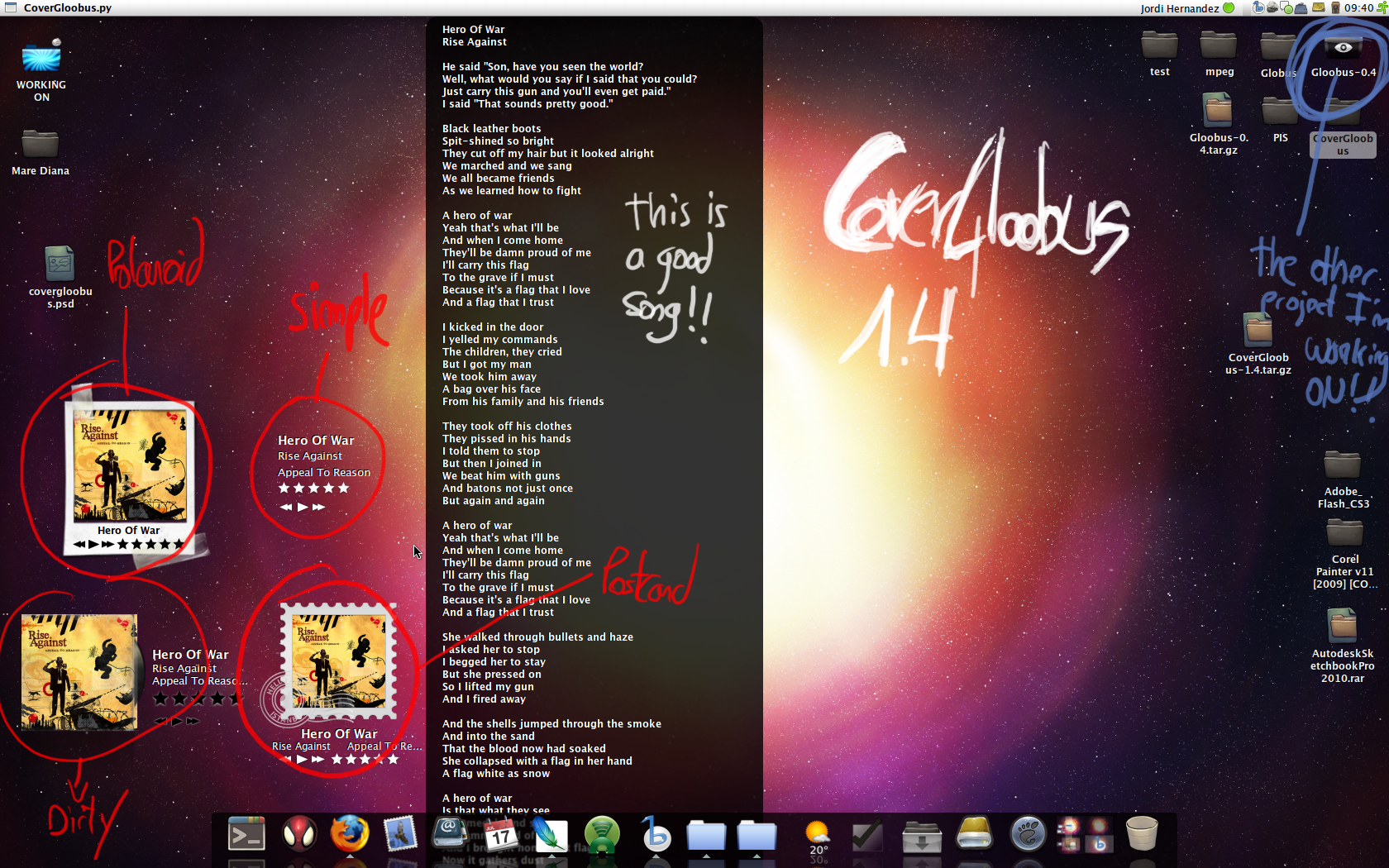
Banshee + CoverGloobus = Awesome!

I've wanted to do this for a while now, and finally I've got it working as I want. I'm talking about running Banshee and the screenlet (or widget) style application CoverGloobus. This is what it looks like on my desktop:


I've created a script that will launch CoverGloobus when I start Banshee, and quit it again when I exit Banshee. Thanks to stroyan and MadCow108 from the UbuntuForums.org for helping me with this script. Here is the script:

#!/bin/bash
# My first script
/home/username/.CoverGloobus/CoverGloobus.py &
CoverGloobusPID=$!
banshee-1 --redirect-log --play-enqueued %U
kill $CoverGloobusPID


Of course you have write the correct path for the CoverGloobus folder.
CoverGloobus is very slick looking and easy to customize. There's some very nice themes to choose from (click the preview below). A cool feature is that CoverGloobus can download lyrics of the song your playing simply by middle clicking on the applet. This is the work of Jordi Hernàndez who also is responsible for Gloobus (which I blogged about some time ago).


Sources:

- http://jordihp.deviantart.com/
- http://banshee-project.org/download/

Jul 8, 2009

Google Chrome OS based on Linux

There has been much speculation whether Google would come up with their own operating system, but now we can stop speculating. Sundar Pichai of Google wrote on their blog that they will have it ready for next year.

The upcoming operating system be called Google Chrome OS and will initially be aimed Netbook. Focus is on speed, security and ease of use, three points that Google does not think always has top priority among other operating systems.
Google Chrome OS will be a lightweight OS that can boot and get online in seconds. Security against malware and viruses are designed in from the outset and should eliminate these threats.

The OS is based on Linux and will be running on both x86 and ARM processors. As with Chrome will be open source, but the code will only be released a little later this year.
On the blog notes Pichai, that there is no close connection with Android as they go after two different markets. However, there will be areas where the two operating systems will overlap.

Unlike the Android project, Google has some important partners from the beginning. Lenovo, Acer, ASUS, Hewlett-Packard is the most well-known partners. In addition, Qualcomm, Adobe, Freescale and Texas Instruments will also team up with Google.

Source: http://googleblog.blogspot.com/2009/07/introducing-google-chrome-os.html

Mr.doob's boot


As I've mentioned earlier Ubuntu Karmic will get a whole new, shiny and flicker-free boot experience. In other words, the sequence of events between switching on your computer and your desktop session will be largely redeveloped and redesigned.

The standard boot sequence will not include Usplash any longer, instead, the X-session will be started right away. Therefore, the graphical boot splash screen will have the whole X-stack available, including hardware acceleration...

The DX and Design teams are looking for help in the form of fresh, innovative concepts, and that is exactly what Mr. Doob has submitted. Mr. Doob has created a extremely simple, very slick and super sexy design as you can see below.


Xens suggested, in a thread on the ubuntu forum, that we should extend (not reduce) the boot time, because we need time to watch this beautifull splashscreen ;-)

Anyway, let's hope that the folks at Canonical embraces this design, unless they've got something even better. I'm very much looking forward to Ubuntu 9.10.

Source: https://wiki.ubuntu.com/Artwork/Incoming/Karmic/Boot

Jul 1, 2009

Random Artwork...

I've been working with Scott Ritchie to create a "branding-ubuntu" package. His blogpost is posted on Planet Ubuntu and so perhaps you've already read that the package is now available in Karmic. Personally I think the new artwork looks much more up-to-date.
Three different vector card backs were created before I was satisfied.


While the sun was shining outside, I spent my morning inside working on random artwork. Here are some samples for you to enjoy or post critique on. Although these splash screens are created for the Ubuntu branding package, everything is still in the initial stage and nothing has been decided yet.


It's kind of hard to know what will fit the other elements of the Karmic Koala artwork. So for now, these are my suggestions. (The images should not look this compressed! Blogger is just so annoying)

Although I would really love to be free from the proprietary software I spent my money on, there's just no way to live without Adobe CS suite. Today I spent some time in After Effects and I have to say that despite being a Photoshop wizard, this is something completely different. I’m sure many companies use Adobe products because it’s so simple to create something that looks good. After familiarizing myself with the UI, I created the video below. It took two minutes using a template. Of course the downside is that there will be 500 banners that looks like yours.


I've also started working on some sound stuff, but sadly there is nothing worth listing to yet. From my Behance portfolio you can of course still grab my former system sound creation.

Jun 30, 2009

Firefox 3.5 is here!!!

Mozilla has officially released Firefox 3.5, the next major version of its popular open source Web browser. ArsTecnical has an in-dept look at the new version and evaluated its enhancements. Support for HTML 5 video and other important emerging Web standards make this one of the most significant Firefox releases ever.

Watch Mike Beltzner (Director of Firefox) talk about what’s new


The Firefox 3.5 release builds on the browser's existing strengths to offer a high-quality user experience with a lot of rich new functionality. The addition of HTML 5 video, the faster JavaScript engine, and the new developer-oriented rendering features will boost innovation on the Web and help free users and developers from proprietary-plugin prison. The new privacy, session management, and user interface features will help Firefox stay competitive as its challengers gain greater momentum. In general, this is a great time for the Web. The browser market is becoming increasingly vibrant and enjoying real competition and progress as the growing demand for more powerful Web applications drives the adoption of emerging standards.

Source: http://arstechnica.com/

Moovida


Earlier I wrote about Elisa, the Media Center application that later was renamed Moovida.

If you want to give Moovida a try, Ubuntugeek.com has recently posted an article with a installation guide (using the PPA) for this free media player that plays all your files – AVI,mp3,MKV,DivX,MOV,MP4.

Source: http://www.ubuntugeek.com/moovida-free-media-player-play-all-your-files-avimp3mkvdivxmovmp4.html

Do 0.8.2 Released


After 3 months of work GNOME Do 0.8.2 was just released! Peng has a great post with some of the highlights among all the fixes/improvements. If you want more information about this release, visit the mailing list or the release announcement.

Grab the source here and the plugins source here.

Jorge Castro has taken a deeper look at GNOME Do and explored some of it’s more advanced features.

Source: http://pengdeng.com/blog/2009/06/30/do-0-8-2-released/

Jun 26, 2009

Shiny and flicker-free boot experience in 9.10 after all

Although Plymouth won't make it into Ubuntu Karmic, Mat Tomaszewski recently posted information about the boot experience, and it sounds like there's something to look forward to after all. The DX and Design teams are looking for help in the form of fresh, innovative concepts in particular regarding the graphical boot splash (spinners, animations, artwork, etc.). Mat posted this message to the artwork mailinglist today:

Hi Everyone,

As some of you may already know, Ubuntu Karmic will get a whole new, shiny and flicker-free boot experience. Another words, the sequence of events between switching on your computer and your desktop session will be largely redeveloped and redesigned.

New stuff includes:
- grub 2, which will be silent, only accessible on-demand (by holding down Shift during Bootloader initialization),
- KMS-powered experiences for the initial boot splash, password encrypted filesystem and disk-check,
- Graphical boot splash that will be running on top of X-server, not Usplash,
- Graphical OS Switcher available by pressing ESC during the startup sequence, also running on top of X,
- GDM 2.

What's most important is: the boot will be *a lot* faster than in Jaunty (sorry, no precise figures yet!). In fact, the Platform Team (Scott James Remnant leading the efforts) aims at making the X-server start in *no more than 3 seconds* on a reference machine (Dell Mini 9/Mini 10v). What it means is that the standard boot sequence will not include Usplash any longer, instead, the X-session will be started right away.
Therefore, the graphical boot splash screen will have the whole X-stack available, including hardware acceleration...

The important news is that the look&feel of the new boot experience has not been defined yet. Otto Greenslade (CC'd) is leading the work there, but I'm sure he would appreciate any help. Fresh, innovative concepts is what we're looking for (in-line with Ubuntu branding of course!), in particular regarding the graphical boot splash (spinners, animations, artwork, etc.).

The design guidelines can be found here: https://wiki.ubuntu.com/DesktopExperienceTeam/KarmicBootExperienceDesignSpec

Please poke kwwii or chaotic (that's Otto) on irc if you need any further info!

Cheers,

Mat

Sounds fantastic to me!

Kenneth Wimer has created https://wiki.ubuntu.com/Artwork/Incoming/Karmic/Boot as a place
for people to share ideas and information.

Jun 24, 2009

New Intel/Nokia partnership a huge win for mobile Linux


ArsTechnica writes about the new Intel/Nokia partnership, where Intel and Nokia announced plans to build a new class of mobile devices that will deliver a richer Internet experience. They have formed a strategic relationship that will involve developing new Intel chips and working together to advance mobile Linux technology.

The companies said they wanted to merge the computing and mobile worlds in pocketable devices but otherwise were vague on product details. Several industry analysts were disappointed at the lack of product details in the announcement and speculated that the device could be a smartphone, an MID, a netbook, or an e-book reader. It's too early to predict, as designs of mobile devices consistently change, they said.

The strong commitment to Linux by Intel and Nokia is a sign of growing consensus in the mobile industry that the open source operating system will play a central role in delivering the underlying foundation of the software experience on portable computing products. This is for sure great new for Linux.

Read the whole story here...

Source: http://arstechnica.com/

Top 10 Firefox 3.5 Features

Firefox 3.5 is a pretty substantial update to the awesome open-source browser, and it's just around the corner. Lifehacker has a list of what features, fixes, and clever new tools are worth getting excited about in the next big release. There's a good reason why Video superpowers with HTML 5 is number one - check out the video below.

10. Undo closed window
9. Forget this site
8. Tab tearing
7. Keyword AwesomeBar filters
6. Smarter session restore
5. Private browsing mode
4. Color profiles that pop
3. TraceMonkey JavaScript engine
2. Geo-location
1. Video superpowers with HTML 5


Source: http://lifehacker.com/5295655/top-10-firefox-35-features

Jun 21, 2009

I'm Not Dead!!!

You might have noticed a sudden drop off in the number of blogposts on this site. Let me start of by affirming that I’m not dead, far from. My wife recently gave birth to our second child, which means I’m now a father of two boys. When I’m not changing diapers I try to keep my professional career alive (www.heyya.dk, www.myspace.com/madsrosendahlkvintet, www.myspace.com/madsrosendahl).
Of course the computer have been turned on occasionally, but I simply haven’t found the time to blog – let alone keep up with everything that is going on in the Linux world.

I did spend an evening working on some Ubuntu-themed branding as ScottRitchie wrote about on the Karmic artwork wiki. If you’ve read my post “Mocking Up Aisleriot” you’ll know what this is all about.
The artwork has changed a little since the mockup. You can now download and “install” the actual artwork.

https://wiki.ubuntu.com/Artwork/Incoming/Karmic/Solitaire


It was kind of disappointing to see that my post to the artwork and Ayatana mailinglist didn’t create any feedback at all – not a single post on eighter.

I also replaced the Gnome foot on the tiles in mahjongg with the Ubuntu logo. You can grab the Ubuntu-themed version of postmodern.svg here...


In the coming weeks you can expect only very few posts on the site, but I’m not dead and nor is the site. Thank you for reading this post and not abandoning this blog completely.

Jun 11, 2009

Native Multi-Touch Support On Linux

Phoronix writes about Mohamed-Ikbel Boulabiar and his team at the Interactive Computing Lab in ENAC, Toulouse that have been successful in bringing native multi-touch support to Linux. While there is Multi-Pointer X in the mainlinue X.Org server (to be released with X.Org 7.5 / X Server 1.7), there is now multi-touch support to be able to handle gestures and other actions.

This multi-touch support requires the Linux 2.6.30 kernel. How this works right now is by reading the input events, translating them into multi-touch events using simple gesture recognition, and then sending D-Bus messages over to Compiz to produce multi-touch effects. Right now the code is deemed just a proof of concept, but they are currently working on a better implementation. More information on their current Linux multi-touch work is available through the project web-site. Below is a video they had recorded yesterday showing off some of their multi-touch work on Linux.


Microsoft is already light-years ahead in this area with their Surface product. Multi-touch has also been receiving a lot of focus in the development of Windows 7 and MS recently showed off a collection of multitouch-exclusive softwares and games collectively known as the “Microsoft Touch Pack for Windows 7“. I hope Linux soon will be able to step up to the competition - game on!

More info: http://www.lii-enac.fr/en/projects/shareit/linux.html

Source: http://www.phoronix.com/

Ubuntu Usability

Are you using Ubuntu 9.04? The Design team at Canonical want you to take ten minutes to help improve Ubuntu by completing the Ubuntu Usability Study.

Ubuntu Usability Study

On a related note, the One Hundred Papercuts project has been kicked off with over 60 bugs reported. A paper cut is a bug that will improve user experience if fixed, it's small enough for users to become habituated to it, and is trivial to fix.” Canonical’s nascent User Experience and Design team is determined to identify one hundred paper cuts to be fixed before Ubuntu 9.10 “Karmic Koala” is released in October.

Read more in David Siegels blogpost here...

Jun 9, 2009

GRUB 2 now default for new installations

Colin Watson just announced that GRUB 2 now will be default on new Ubuntu 9.10 installations. Colin posted this message to the ubuntu-devel-announce mailinglist:

As of tomorrow's daily builds (assuming they build successfully,
anyway), GRUB 2 will be the default boot loader for new installations,
pursuant to the grub2-as-default discussion at UDS.

We do not expect to be changing the boot loader for existing
installations, at least not at this time; this is an inherently risky
operation. (Remember that we don't even automatically reinstall the boot
loader when we upgrade to new versions of GRUB Legacy, let alone when
changing to a complete reimplementation.) However, if you wish to
upgrade your system to GRUB 2, then see this page for instructions:

https://wiki.ubuntu.com/KernelTeam/Grub2Testing

Please report any problems ('ubuntu-bug -p grub2', or
https://bugs.launchpad.net/ubuntu/+source/grub2 if you can't use
ubuntu-bug for some reason), particularly if they seem to be regressions
from GRUB Legacy. We're very keen to make sure that this is as close to
trouble-free as possible for users doing fresh installations of 9.10
when it's released.


source: https://lists.ubuntu.com/archives/ubuntu-devel-announce/2009-June/000573.html

Jun 6, 2009

Zeitgeist Icon And UI


If you haven't already heard about Gnome Zeitgeist, it's a tool for easily browsing and finding files on your computer currently in development and planed for Gnome 3 (video demo here). Sebastian Faubel came up with this nice icon you see above for Zeitgeist. Seif Lotfy is hacking on an alternative GTK+ UI for the Zeitgeist engine and it is almost complete. To support ARM based UNR distributions he decided not to use clutter. The Categories are created dynamically ("most used" and "bookmarks" will be added to the final version).


Gnome Zeitgeist is looking promising.

Source: http://seilo.geekyogre.com/2009/06/some-zeitgeist-visuals/

Jun 5, 2009

Get your fresh games here!

If you like games, perhaps you've already read my post "Mocking Up Aisleriot", today there's more game news for you.

Tim Horton is participating in the Google Summer of Code and is hacking away on the Gnome Games. Tim recently set up a Launchpad PPA. A PPA would be a great way for people (people using Ubuntu, at least) to get ahold of the very latest work being done with Gnome Games, provide a lot more eyes, and encourage much more feedback from the community during the summer development process.

The gnome-games-experimental PPA currently contains all of the dependencies for Tim's branch of Gnome Games (including WebKit, seed, gobject-introspection, and Clutter), as well as a build of Gnome Games itself. This build includes three branches:

gsoc-seed-games - Ports of Same Gnome and Mines to Clutter+Seed, and a new game, Lights Off

gnibbles-clutter - Guillaume Beland’s port of Gnibbles to the Clutter canvas

sudoku-tube - Zhang Sen’s implementation of joint Sudoku games over Telepathy tubes

Keep in mind that Google Summer of Code has only been running for a week and a half, so if you go ahead and try out the PPA today, expect to see very little working, and within what works, lots of horribleness. However, if you do decide to jump onto the cutting edge, you can feel awesome about yourself for helping out, and you’ll also get to play with the finished products long before anyone else.

Tim's plan is to update the packages in this PPA once a week at the minimum. It seems to install properly against a fresh Jaunty install (just add the repository, upgrade gnome-games, and watch as the dependency list explodes in your face; most of those won’t end up actually being dependencies of Gnome Games, it’s gir-repository’s fault…); Karmic builds will be ready soon. As mentioned there's no promises about stability or about these packages not screwing up your machine (especially things that use WebKit)… but if you have trouble, again, please post feedback!

Source: http://www.hortont.com/blog

Mocking Up Aisleriot

Today I read this mailinglist post from Scott Ritchie. A new "branding-ubuntu" package allows for branding arbitrary graphics in a derivative friendly way sounds like a fantastic idea.
I really want to contribute and so today I looked at the Gnome card game Aisleriot as project number one. I wanted to create a new background for the "table" and new card backs.
The current graphics looks kind of out dated, so I quickly created this first brainstorm mockup.


As you can see (maybe you didn't notice) I used the tiled wallpaper (with the small Ubuntu logo) from my Ubuntu Wanted website layout.

There is still a long way to go for this first prjoect, and I know that my work isn't exactly what Scott Ritchie was looking for.


more to come...

Jun 2, 2009

Banshee 1.5.0 released!


Banshee 1.5.0 (aka 1.6 beta 1) has just been released. There's a list of new features, enhancements and bug fixes here.

New Features:

* Powerful unicode-aware case-insensitive search; i.e. n matches Ñ and vice-versa
* Locale-specific, case-insensitive, unicode-aware sorting
* Artist/album/track sort fields support; i.e. can set artist sort to "Beatles, The"
* Separate library locations for Music, Video, and Podcast
* Creative Commons-aware license column/field
* Score column/field, automatically updated when played/skipped
* Beats per minute (BPM) support: column/field, preference to autodetect library-wide
* Rhythmbox library/metadata importer


This is a beta release, debuting a lot of big underlying changes. It also has tons of fixes, polish, and performance improvements. It is the result of six months work by more than 30 contributors.

Banshee is looking awesome as always and I really hope Banshee will replace Rhythmbox in Ubuntu 9.10.

If you digg Banshee you might also find Neil Loknath's blogpost title "Banshee Going Telepathic!" interesting. Neil has done some cool stuff, like added the option to announce what Banshee is currently playing to all of your contacts. Check it out here.

More info and download links for Banshee 1.5.0: http://banshee-project.org/download/archives/1.5.0/