The 3rd Ubuntu Developer Week has just started. This is the best opportunity to get involved in Ubuntu Development. Top-notch talkers, top-class sessions, Getting Started session in multiple languages.
The Ubuntu Developer Week will have one week of action-packed sessions from Jan 19th to Jan 23rd!
In just four years, Ubuntu has become the most popular Linux distribution in the world with millions of users and a spot regularly at the top of Distrowatch. Ever wondered how Ubuntu development works? How to get involved yourself? Find out from Jan 19th to Jan 23rd!
Ubuntu Developer Week is a series of online workshops where you can:
* learn about different packaging techniques
* find out more about different development teams
* check out the efforts of the world-wide Development Community
* participate in open Q&A sessions with Ubuntu developers
* much more...
To view the schedule and get more information, visit:
https://wiki.ubuntu.com/UbuntuDeveloperWeek

Jan 19, 2009


Jan 15, 2009
Ubuntu 9.04 boots in 21.4 seconds
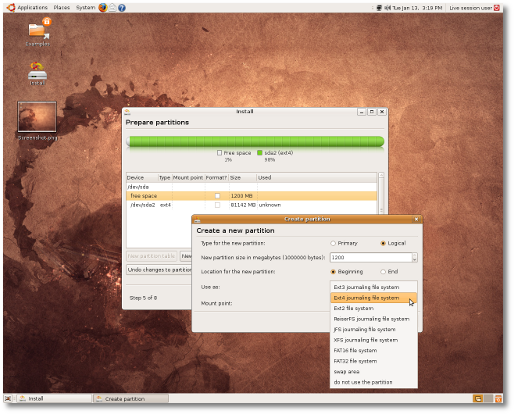
Softpedia reports that Ubuntu 9.04 Boots in 21.4 Seconds using the current daily build and the newly supported EXT4 file system.
The article provides some interesting test results, as you can see below:
· Ubuntu 8.10 with EXT3 filesystem boots in 31.8 seconds (on the AMD Sempron system);
· Ubuntu 9.04 Alpha (Build 20090112.1) with EXT3 filesystem boots in 28.3 seconds (on the AMD Sempron system);
· Ubuntu 9.04 Alpha (Build 20090112.1) with EXT4 filesystem boots in 23.1 seconds (on the AMD Sempron system).
· Ubuntu 8.10 with EXT3 filesystem boots in 26.8 seconds (on the Intel Core 2 Duo system);
· Ubuntu 9.04 Alpha (Build 20090112.1) with EXT3 filesystem boots in 24.5 seconds (on the Intel Core 2 Duo system);
· Ubuntu 9.04 Alpha (Build 20090112.1) with EXT4 filesystem boots in 21.4 seconds (on the Intel Core 2 Duo system)!
From the article:
Linux hardware site Phoronix has released benchmarks based on extensive Ext4 performance testing that was conducted with a solid-state drive. The most impressive results can be seen in the IOzone test, which measures write performance for a large file. In this test, Ext4 annihilated the competition and significantly outperformed XFS, JFS, ReiserFS, and Ext3. The new filesystem also outpaced its peers in the Intel IOMeter File Server Access Pattern Test.

Source: Slashdot
Source: Arstechnica
The article provides some interesting test results, as you can see below:
· Ubuntu 8.10 with EXT3 filesystem boots in 31.8 seconds (on the AMD Sempron system);
· Ubuntu 9.04 Alpha (Build 20090112.1) with EXT3 filesystem boots in 28.3 seconds (on the AMD Sempron system);
· Ubuntu 9.04 Alpha (Build 20090112.1) with EXT4 filesystem boots in 23.1 seconds (on the AMD Sempron system).
· Ubuntu 8.10 with EXT3 filesystem boots in 26.8 seconds (on the Intel Core 2 Duo system);
· Ubuntu 9.04 Alpha (Build 20090112.1) with EXT3 filesystem boots in 24.5 seconds (on the Intel Core 2 Duo system);
· Ubuntu 9.04 Alpha (Build 20090112.1) with EXT4 filesystem boots in 21.4 seconds (on the Intel Core 2 Duo system)!
From the article:
'There are only two days left until the third Alpha version of the upcoming Ubuntu 9.04 (Jaunty Jackalope) will be available (for testing), and... we couldn't resist the temptation to take the current daily build for a test drive, before our usual screenshot tour, and taste the "sweetness" of that evolutionary EXT4 Linux filesystem. Announced on Christmas Eve, the EXT4 filesystem is now declared stable and it is distributed with version 2.6.28 of the Linux kernel and later. However, the good news is that the EXT4 filesystem was implemented in the upcoming Ubuntu 9.04 Alpha 3 a couple of days ago and it will be available in the Ubuntu Installer, if you choose manual partitioning. The bad news is that EXT4 will not be the default filesystem for the Ubuntu OS until version 9.10, due for release in late October this year.
Linux hardware site Phoronix has released benchmarks based on extensive Ext4 performance testing that was conducted with a solid-state drive. The most impressive results can be seen in the IOzone test, which measures write performance for a large file. In this test, Ext4 annihilated the competition and significantly outperformed XFS, JFS, ReiserFS, and Ext3. The new filesystem also outpaced its peers in the Intel IOMeter File Server Access Pattern Test.
Source: Slashdot
Source: Arstechnica
Jan 14, 2009
New refreshed look for KDE NetworkManager interface
In most modern Linux distributions, network configuration is handled by NetworkManager, a desktop-neutral service that seamlessly manages connections. It leverages D-Bus and HAL to provide a standardized programming interface through which higher-level applications can interact with network configuration and expose networking functionality to the end user. NetworkManager has largely eliminated the need for managing network configuration through text files or the command line in all but a few corner cases.

KDE and GNOME both have their own custom graphical frontend components for NetworkManager that make it easy for users to connect to wireless networks and perform other network-related configuration tasks. KDE uses the KNetworkManager component, which was in dire need of a refresh for KDE 4.
KDE contributor Sebastian Kügler is working on a new Plasma-based front-end that takes advantage of the NetworkManager support in Solid, KDE's hardware abstraction layer. The latest prototype, which is available from KDE's version control system, has a lot of potential.
In a blog entry about the new plasmoid, Kügler discusses the various usability lessons that he learned from testing WiFi configuration tools on other platforms, including Maemo, an iPod Touch, Windows, and the GNOME NetworkManager panel applet. He attempted to draw on the best elements of those while avoiding their mistakes.
"So one of my personal goals is to not make all those mistakes in the interface for networkmanager in KDE4. We're not there yet, but progressing OK," he wrote. "It is in no way near release quality yet, more like an early Alpha. We're trying to have a first working version out within the next couple of months, hopefully in time for the distros that ship in spring."
It won't be included in KDE 4.2, he says, but he hopes that it will be ready for KDE 4.3.
Source: Ryan Paul
KDE and GNOME both have their own custom graphical frontend components for NetworkManager that make it easy for users to connect to wireless networks and perform other network-related configuration tasks. KDE uses the KNetworkManager component, which was in dire need of a refresh for KDE 4.
KDE contributor Sebastian Kügler is working on a new Plasma-based front-end that takes advantage of the NetworkManager support in Solid, KDE's hardware abstraction layer. The latest prototype, which is available from KDE's version control system, has a lot of potential.
In a blog entry about the new plasmoid, Kügler discusses the various usability lessons that he learned from testing WiFi configuration tools on other platforms, including Maemo, an iPod Touch, Windows, and the GNOME NetworkManager panel applet. He attempted to draw on the best elements of those while avoiding their mistakes.
"So one of my personal goals is to not make all those mistakes in the interface for networkmanager in KDE4. We're not there yet, but progressing OK," he wrote. "It is in no way near release quality yet, more like an early Alpha. We're trying to have a first working version out within the next couple of months, hopefully in time for the distros that ship in spring."
It won't be included in KDE 4.2, he says, but he hopes that it will be ready for KDE 4.3.
Source: Ryan Paul
Jan 9, 2009
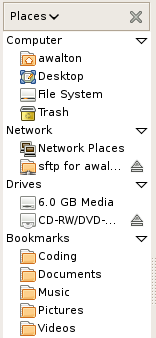
Nautilus Places Reorganization
Back in December I wrote about how the Nautilus places menu looks very cluttered. If you also think a change is needed, you can post your opinions on bugzilla on Bug 508404 – "Sidebar should categorize items displayed with headings":
http://bugzilla.gnome.org/show_bug.cgi?id=508404
http://bugzilla.gnome.org/show_bug.cgi?id=508404
Jan 8, 2009
"Linux killer" in Beta

It's only very rarely that this blog features news not related to Ubuntu / Linux (You could say that this is related to bug #1), and actually I've never written about Microsoft Windows before. That changes today. A lot of blogs are writing about Windows 7 as "the linux killer" - this one doesn't - although the Windows 7 experience is overwhelming positive.
On Friday, January 9, 2009, Microsoft will make the Windows 7 Beta and the Windows Server 2008 R2 Beta available to the public via four different locations on Microsoft.com, each of which is oriented towards a different customer type. I don't have exact URLs yet, but suffice to say that the download availability will be obvious.
Microsoft learned a few lessons the hard way with the release of Vista, and there's no doubt that they'll do everything not to make the same mistakes again. With a lot of enhancements, both visual and under the hood, Windows 7 is going to be a product that will win some lost Windows users back. Windows 7 has faster boot and shutdown time, that both Vista and XP. The hardware requirements have been lowered and Windows 7 will now run well on netbooks like the eee PC.
At the recent PDC, where Windows 7 was unveiled, Windows and Windows Live senior vice president Steve Sinofsky claimed that Windows 7 used less than half of the 1 GB of RAM on his Lenovo S10 netbook," Gralla wrote on October 31st. "Making the new operating system lightweight has clearly been Microsoft's goal."
The next day, Gralla gave one more reason: "The return rate for Linux netbooks is at least four times as high for Linux machines as it is for XP ones for at least one netbook maker [MSI]... The reason? People find Linux too hard to use."
There's also rumors that users buying a computer with Vista preinstalled after July, will be able to upgrade to Windows 7 for free.
I've had the opportunity to try this new Microsoft product and I have to say, one thing Microsoft does really well is make it look good. If you are dualbooting (Linux - Windows) perhaps the BETA is worth trying out.
For more information, screenshots and reviews on Windows 7 visit Paul Thurrott's SuperSite
Jan 5, 2009
Wallpaper artwork for Jaunty alphas
Back in december 2008 Kenneth Wimer posted a message on the ubuntu-art maillinglist asking people to submit wallpaper artwork for the Ubuntu 9.04 (Jaunty) Alpha releases.
Kenneth wrote:
There's already a few proposals uploaded to the wiki. https://wiki.ubuntu.com/Artwork/Incoming/Jaunty/AlphaBackgrounds.
So far, this one is my favorite

Kenneth wrote:
Wouldn't it be nice to offer a wallpaper for the Jaunty alphas? People working
on a test system would immediately know it and it might spur interest as well
(or rants, etc). I don't want to put any restrictions on the design, the
point is just to get something different in. If it helps to test out any
ideas or work towards some goal that is an added bonus. All entries should go
on the wiki.
There's already a few proposals uploaded to the wiki. https://wiki.ubuntu.com/Artwork/Incoming/Jaunty/AlphaBackgrounds.
So far, this one is my favorite
Suspend/resume solved in Kernel 2.6.29
It sounds like one of the major bugs in Linux has been solved. On Linus' blog he wrote two posts on suspend/resume. The first one titled "Debugging hell" and the last one titled "Life is good again...". If this fix is for any suspend/resume in general is still questionable?
As a response to a question in the comments, Linus wrote:
Source: http://torvalds-family.blogspot.com/
As a response to a question in the comments, Linus wrote:
...it's too late to hit the 2.6.28 release (the fix is fairly small, but very invasive), so it will go in early in the 2.6.29 merge window...
Source: http://torvalds-family.blogspot.com/
Jan 4, 2009
Elisa Job Offer
Elisa is entering in a new growing phase and they are looking for talented engineers to join their team. Several positions are open. Read the full news for details.
Elisa is an open source cross-platform media center connecting the Internet to an all-in-one media player. It features an intuitive interface with a professional look and feel which can be easily used with a standard TV remote control.
Job offer: python engineer UI orientated, backend or web developement.
source: http://elisa.fluendo.com/news/31/
Elisa is an open source cross-platform media center connecting the Internet to an all-in-one media player. It features an intuitive interface with a professional look and feel which can be easily used with a standard TV remote control.
Job offer: python engineer UI orientated, backend or web developement.
Elisa is a free and open source media center working on Windows and Linux. The goal of the project is to provide software that lets the user enjoy their multimedia content in an easy and user-friendly way, on a television or on a computer monitor. It organizes the media collection and gives rapid access to watching videos, pictures, and listening to music while simultaneously interacting with contextual information and services. Elisa features a very animated, interactive user interface whose success depends on good usability and aesthetics.
On the technical side it relies on 3D hardware acceleration to provide inexpensive and fluid user experience. Although Elisa is written in Python it uses a handful of base libraries written in C, such as GStreamer for media playback, Pigment, its graphical engine, which in turn uses OpenGL to take advantage of the graphical hardware.
Elisa has been in development for over 2 years and is close to its first stable release. The company will enter a new growing phase, and we are looking for talented engineers to help us become a leader in media experience.
Motivation and a genuine will to create a usable and useful piece of software for everyone are the keys for a successful applicant. Severals positions are opened :
UI development:
* Build an innovative user interface with OpenGL
* Create new 3D effects and visualization mode
Web development:
* Manage the software and the community website
* Build web services to improve Elisa
* Build internal procedure and company intranet with the management
Core and plugins integration :
* Add new services to Elisa
* Help contributors to create and integrate new plugins in Elisa
* Work on Elisa's core
Our internal organization creates opportunity to change from a position to another during the development process. The working language is English.
Please send your resume to: lionel@fluendo.com
source: http://elisa.fluendo.com/news/31/
Jan 1, 2009
The Future of Compiz In Question

Rather than announcing a road-map for 2009 or sharing all of the accomplishments this year that were made within the Compiz development community, Kristian Lyngstol has shared some grave concerns for this project that brought "desktop bling" to Linux. Kristian has outlined a few areas that that he believes need to be addressed otherwise it could mean the death of Compiz. Compiz in fact is just losing developers at this point and with the different forks taking place there is much stagnation occurring within Compiz.
Kristian believes that there is a lack of leadership and direction that has caused virtually no major work to get done since the Compiz Fusion creation (Beryl merger) in 2007. Compiz hasn't seen any new developers contributing significantly to the core development efforts since that time, but instead are losing their developers.
Blamed for this unfortunate state is the lack of project goals, inconsistent organization, and undocumented code. When it comes to the inconsistent organization, Compiz still has multiple bug trackers, developer mailing list, source-code repositories, etc. Kristian believes that these problems must be addressed before work on Compiz continues. He is also calling for clear goals to be defined for each release.
The Compiz community also needs to decide what to do with the branches of Compiz that are out there already. Compiz++, which is a rewrite of Compiz in C++, separates the OpenGL and Composite layers, a new plug-in interface, and brings forth several other significant changes.
To read all of what Kristian Lyngstol had to write about the future of Compiz, read his mailing list post.
Source: Phoronix - Michael Larabel
Dec 28, 2008
Ubuntu Usplash Smooth
As we wrote earlier, it has been discussed if Plymouth will replace Usplash in Ubuntu 9.04. It turns out there will be no Plymouth for Ubuntu 9.04 as we were hoping for. Currently Plymouth is planed for Ubuntu 9.10 due to the lack of KMS in the kernel.
This means the current Usplash will remain as boot screen for Ubuntu 9.04. But hopefully there will be added a small change to the Usplash called Usplash Smooth. This is the original Ubuntu Usplash for Intrepid Ibex with an exciting twist! The progress bar in Usplash Smooth is time-based. It remembers the time of your previous boot/shutdown, and will smoothly increase the bar according to this time. Since the boot/shutdown times change very little, you will get a very precise bar with a very smooth animation showing exactly how much time is left.
The original Ubuntu Usplash progress bar didn't tell you much information. It moves in small/huge increments, and sometimes stands still for a few seconds.
Let's hope this little twist will be added in Ubuntu 9.04. Anyway, check out the project below, and post your opinions!
Direct Download:
Ubuntu Usplash Smooth (Hosted at gnome-look.org)
Ubuntu Usplash Smooth (Hosted at ubuntu-art.org)
Ubuntu PPA:
https://launchpad.net/~usplash-smooth/+archive
Ubuntu WIKI:
https://wiki.ubuntu.com/UsplashSmooth
Ubuntu Brainstorm:
http://brainstorm.ubuntu.com/idea/15741/

This means the current Usplash will remain as boot screen for Ubuntu 9.04. But hopefully there will be added a small change to the Usplash called Usplash Smooth. This is the original Ubuntu Usplash for Intrepid Ibex with an exciting twist! The progress bar in Usplash Smooth is time-based. It remembers the time of your previous boot/shutdown, and will smoothly increase the bar according to this time. Since the boot/shutdown times change very little, you will get a very precise bar with a very smooth animation showing exactly how much time is left.
The original Ubuntu Usplash progress bar didn't tell you much information. It moves in small/huge increments, and sometimes stands still for a few seconds.
Let's hope this little twist will be added in Ubuntu 9.04. Anyway, check out the project below, and post your opinions!
Direct Download:
Ubuntu Usplash Smooth (Hosted at gnome-look.org)
Ubuntu Usplash Smooth (Hosted at ubuntu-art.org)
Ubuntu PPA:
https://launchpad.net/~usplash-smooth/+archive
Ubuntu WIKI:
https://wiki.ubuntu.com/UsplashSmooth
Ubuntu Brainstorm:
http://brainstorm.ubuntu.com/idea/15741/
Dec 22, 2008
Mark Shuttleworth on Notifications, indicators and alerts
Today Mark Shuttleworth, the founder of Canonical, wrote a blogpost about the new notification feature in the upcoming Ubuntu 9.04.
Read Mark's entire blogpost here...
Read Mark's entire blogpost here...
Dec 19, 2008
Launchpad User Experience
Mark Shuttleworth, the founder of Canonical, recently wrote a blogpost titled "Morphing dialogs and the AJAX roadmap for Launchpad".
Over the next couple of months you will see pieces of this puzzle land in successive Launchpad monthly releases. In the video below you can see a couple of the key ideas.
Read Mark's entire blogpost here...
The user experience and design team at Canonical includes a few folks dedicated to web technology. At the moment, there is a substantial effort under way to reshape the Launchpad UI now that we have the core capabilities for cross-project bug tracking, code publishing and translation in place. We want to make it more obvious how to get something done - especially for new users - and we want to make it feel snappy and responsive when making small changes to your project data.
Over the next couple of months you will see pieces of this puzzle land in successive Launchpad monthly releases. In the video below you can see a couple of the key ideas.
Read Mark's entire blogpost here...
Dec 17, 2008
Nautilus sidebar needs a cleanup
Hylke Bons descripes himself as being a consistent user interface experience junkie. Back in November he posted a mockup of the Nautilus sidebar. The current sidebar looks very cluttered, so let's hope the gnome UI developers will clean it up a bit.

I know that you can report usability-bugs in the Gnome bugzilla - if this one isn't reported yet, it should be.
I know that you can report usability-bugs in the Gnome bugzilla - if this one isn't reported yet, it should be.
No Plymouth for Ubuntu 9.04
Plymouth has now been evaluated for Ubuntu as a replacement to the current USplash. Sadly Plymouth is not going to be default in Ubuntu 9.04, but we may get PPAs for people that are interested in trying it out and have the supported hardware. At the Ubuntu Developer Summit it was suggested that Plymouth should be default by 9.10 - when all the drivers are ready and all critical problems are solved. Plymouth uses kernel mode-setting to provide a cleaner boot experience with minimal flickering of the display since the display only needs to set its mode once.
Here is the video of the UDS session where you can see the discussion process in more detail: http://videos.ubuntu.com/uds/jaunty/Desktop/2008-12-11/morning-post-break/00001.ogv

Looks like there's a lot of great thing to look forward to in Jaunty +1 (Ubuntu 9.10). Although both the facebrowser and Plymouth won't make it into Jaunty, there's no doubt that Ubuntu, and Linux in general, is moving fast forward.
Here is the video of the UDS session where you can see the discussion process in more detail: http://videos.ubuntu.com/uds/jaunty/Desktop/2008-12-11/morning-post-break/00001.ogv
Looks like there's a lot of great thing to look forward to in Jaunty +1 (Ubuntu 9.10). Although both the facebrowser and Plymouth won't make it into Jaunty, there's no doubt that Ubuntu, and Linux in general, is moving fast forward.
Dec 15, 2008
Teacher threatens to call the cops over Linux
If you haven't already read the crazy story that got over 2000 comments and ended up on the front page of Slashdot, read it here.
If you have, you should read the authors follow up titled "character assasinations ain't us"
If you have, you should read the authors follow up titled "character assasinations ain't us"
Dec 11, 2008
UDS developer interviews
The Ubuntu Developer Channel on YouTube has gone live again. Like last time the site will be stuffed full of videos about Ubuntu development. Ones again Tony Whitmore will be doing interviews throughout UDS this week. As we saw with Ubuntu Live in 2007 it is always interesting to get a glimpse into the future of Ubuntu.
Keep an eye on the Ubuntu Developer Channel this week, as more videos are added. There are only a couple so far, but there should be more soon!
Keep an eye on the Ubuntu Developer Channel this week, as more videos are added. There are only a couple so far, but there should be more soon!
Dec 10, 2008
New Notifications for Jaunty
The Ubuntu Desktop team outlined their plans for notifications in Jaunty. I think that Canonical’s work here is looking really good, and has a wonderful design. For those that are not at UDS, it is important to understand some of the changes that has been discussed. The first of which is the removal of “Actions” from notifications. This means that there will be no more buttons inside the notifications at all.
Notifications now are simply there to show you the data about what’s happening on your machine. This can happen in two ways; Synchronously, as you press a button like the volume or brightness controls, the notification comes up and shows you the change, and “normally”, how instant messengers like Pidgin with the libnotify plugin currently work.
Instead of having “Actions” inside of the notification window, they will be moved to a panel applet, which will allow you to get to the application in question by clicking it. There have been a lot of discussions on what this panel applet will be like, but it is probably the biggest missing component in the discussion so far, since we haven’t seen any prototypes on it, or what it’s interface will look like. The Design team that’s working on this seems to be doing so behind closed doors.
So, despite the conflict of the Bazaar vs the Cathedral in the situation we’re in, I’m feeling pretty good about the general work being done. I’m really hoping that I can be a part of it and it won’t be this cabal-like situation where I have to bring patches to Canonical’s door and sacrifice a goat in offering to the Gods of the New Notification Daemon. Or, you know, I could always get off my bum and send my resume in ;).
While this might not be terribly exciting to most, it does show a step forward in usability while adding some nice bling.
Source: A. Walton
Notifications now are simply there to show you the data about what’s happening on your machine. This can happen in two ways; Synchronously, as you press a button like the volume or brightness controls, the notification comes up and shows you the change, and “normally”, how instant messengers like Pidgin with the libnotify plugin currently work.
Instead of having “Actions” inside of the notification window, they will be moved to a panel applet, which will allow you to get to the application in question by clicking it. There have been a lot of discussions on what this panel applet will be like, but it is probably the biggest missing component in the discussion so far, since we haven’t seen any prototypes on it, or what it’s interface will look like. The Design team that’s working on this seems to be doing so behind closed doors.
So, despite the conflict of the Bazaar vs the Cathedral in the situation we’re in, I’m feeling pretty good about the general work being done. I’m really hoping that I can be a part of it and it won’t be this cabal-like situation where I have to bring patches to Canonical’s door and sacrifice a goat in offering to the Gods of the New Notification Daemon. Or, you know, I could always get off my bum and send my resume in ;).
While this might not be terribly exciting to most, it does show a step forward in usability while adding some nice bling.
Source: A. Walton
No facebrowser for Jaunty

A Gobby document from the Desktop-GDM-upgrade session at UDS (witch is on it's third day today), showes that the facebrowser won't make it into Jaunty (Ubuntu 9.04), but it's planned for Jaunty +1. You will be able to change the graphics and layouts of the facebrowser in the theme, but the behaviors will be hard coded.
Read more about the facebrowser here:
- GDM login experience
- Ubuntu's OpenGL face browser will bring bling to GDM"
Open-source Yo Frankie Game
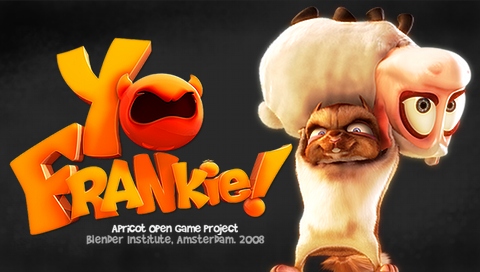
It rarely happens that I mention games on this blog - actually the only post until today, has been the "Guitar Heros" clone post - but today Yo Frankie is available for download. The game is open-source and designed using Blender and the Blender Game Engine. Yo Frankie is an Apricot Open Game Project - even the character art and is available cross platform (at least Linux, Windows, OS X). The source-code, design files, and binaries are freely available.
Find more information on this new Linux game, at the Yo Frankie web-site.
Dec 8, 2008
Eavesdrop on the Jaunty UDS

If you didn't make it to the Ubuntu Developers Summit, here's some good news for you. There's many ways to follow what happens at UDS. As mentioned earlier we hope the Ubuntu Developer Channel on YouTube will be stuffed full of videos about the Ubuntu development and various interviews, but you can already follow what is happening at the summit and contribute comments and ideas to people at the summit.
Here is a list of links you want to visit:
1. The Scoop: The Ubuntu Wiki is the main source for the happen happens at the summit (https://wiki.ubuntu.com/UDS). Any news and changes will be posted there.
2. Schedule: The schedule for the summit can be found at http://summit.ubuntu.com. On the schedule you will be able to find links to the live audio/video streams from the conference and how to VoIP into the discussions.
3. Audio Live Stream : Listen to the live audio stream of the tracks at http://icecast.ubuntu.com/.
4. Micro-blogging: You can follow the feeds of the different tracks and people at UDS (http://whoisi.com/e/uds-jaunty). Or you can follow http://identi.ca/ubuntudevelopers on identi.ca.
5. IRC: Join the channel #ubuntu-devel-summit or #uds on the Freenode IRC network (chat.freenode.net).
6. The Planet: Planet Ubuntu (http://planet.ubuntu.com) aggregates feeds of Ubuntu Member. The Planet will have a ton of information on UDS and plans for Jaunty.
7. Forums: People from the summit will be following thread in the Jaunty Jackalope Testing and Discussion forum. Use the tag of UDS in the forums if you make a thread about the summit.
Please join in the fun, and help make Ubuntu Jaunty Jackalope smashing!
Source: Mike’s Planet
Dec 7, 2008
How to get your TabletPC working on Ubuntu Intrepid
Ugo Sangiorgi did a nice blog post on his OmniModeling project.
Right now OmniModeling is able to recognize multiple strokes as a gesture, so the user is able to draw dashed connections and composite figures as well. And it works with Compiz:
.
Read his blog post "How to get your TabletPC working on Ubuntu Intrepid (+Wubi and Compiz)" here...
Right now OmniModeling is able to recognize multiple strokes as a gesture, so the user is able to draw dashed connections and composite figures as well. And it works with Compiz:
.
Read his blog post "How to get your TabletPC working on Ubuntu Intrepid (+Wubi and Compiz)" here...
Dec 4, 2008
Seeing your contribution matter
It's always nice when people give you positive feedback on your work and contributions, but I guess one of the biggest gestures is when people actually use your work. This has been the case before, with the return of the Hardy Heron cover as we saw back in June, or the Ubuntu Wanted website layout.
This time, I'm proud to see my own artwork for the danish Ubuntu 8.10 Release Party being used. I wasn't attending the release party myself, but I found these pictures from the event.


This time, I'm proud to see my own artwork for the danish Ubuntu 8.10 Release Party being used. I wasn't attending the release party myself, but I found these pictures from the event.


UDS approaching
We're approaching the Ubuntu Developers Summit (8th - 12th December), witch always is the highlight of many Ubuntu contributors calendars. Like last time, we hope the Ubuntu Developer Channel will be stuffed full of videos about Ubuntu development and various interviews.
At the beginning of a new development cycle, Ubuntu developers from around the world gather to help shape and scope the next release of Ubuntu. The summit is open to the public, but is not a traditional conference, exhibition or other audience-oriented event. Rather, it is an opportunity for Ubuntu developers - who usually collaborate online - to work together in person on specific tasks.
Jono Bacon wrote:
As we have already confirmed, Plymouth will be discussed at the UDS, along with a lot of other interesting discussions.
More UDS news to come...
At the beginning of a new development cycle, Ubuntu developers from around the world gather to help shape and scope the next release of Ubuntu. The summit is open to the public, but is not a traditional conference, exhibition or other audience-oriented event. Rather, it is an opportunity for Ubuntu developers - who usually collaborate online - to work together in person on specific tasks.
Jono Bacon wrote:
...But UDS is way more than just sessions. It is about people. UDS brings together a fascinating, inspiring and indelibly social group. There is a fantastic atmosphere at UDS and a very real sense of community. We work hard to try and make UDS feel as welcoming and open to ideas and discussion as we can. It is an opportunity to re-affiirm old friendships and make new ones. Every day we not only work hard together, but we play hard too. Anyone who has been to a UDS will be well aware of just how physically draining it can be: long days full of discussion and long evenings of socialising make for a pretty tiring week. I think my coffee intake increases as the week progresses...
As we have already confirmed, Plymouth will be discussed at the UDS, along with a lot of other interesting discussions.
More UDS news to come...
Dec 2, 2008
Songbird 1.0 is Here!
The long-awaited cross-platform media player Songbird officially reaches its 1.0 release today. The open-source application is built on the same platform as Firefox and promises to bring exciting new innovations to the software jukebox market. Like Firefox, Songbird is extensible, meaning that users can customize the look, feel, and features of Songbird to their heart's content.
Perhaps this is the iTunes killer you've been waiting for?

Grab it here: http://getsongbird.com/
Perhaps this is the iTunes killer you've been waiting for?
Grab it here: http://getsongbird.com/
Nov 30, 2008
Linux commercials
We have all seen the MAC vs. PC commercials - it's like a war! Microsoft begun fighting back, then Apple fights back, and so it will probably go on for years to come.
With SUSE 10, Novel made professional Linux commercials (and did a really good job), but recently I learned that Novel joined the MAC vs. PC war, sending Linux into the battle. The war has even spread to SouthPark. Below you can see the first two MAC vs. PC vs. LINUX commercials from Novel.
With SUSE 10, Novel made professional Linux commercials (and did a really good job), but recently I learned that Novel joined the MAC vs. PC war, sending Linux into the battle. The war has even spread to SouthPark. Below you can see the first two MAC vs. PC vs. LINUX commercials from Novel.
Nov 29, 2008
Installing GNOME Shell in Ubuntu Intrepid
Siegfried Gevatter did a blog post on how to build and test the development version of the GNOME shell. Luckily for us, Siegfried decided to write down all the instructions on how to build it so that others have it easier than he did.
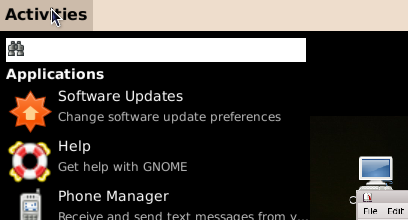
Initial build of GNOME Shell
1. Download gnome-shell-build-setup.sh (wget http://svn.gnome.org/svn/gnome-shell/trunk/tools/build/gnome-shell-build-setup.sh) and run it (bash gnome-shell-build-setup.sh). This will download jhbuild into ~/Source and build it (the executables will end up in ~/bin).
2. Install the necessary build dependencies for gnome-shell (and its bundled dependencies): sudo apt-get install build-essential automake gnome-common flex bison curl git-core subversion gtk-doc-tools mesa-common-dev xulrunner-1.9-dev libdbus-glib-1-dev libffi-dev libgconf2-dev libgtk2.0-dev libgl1-mesa-dev libgstreamer-plugins-base0.10-dev python2.5-dev.
3. Download and build gnome-shell (and its bundled dependencies) by running ~/bin/jhbuild build. All files are placed into ~/gnome-shell.
Running it
1. Run ~/bin/jhbuild shell to enter a subshell, and then follow the remaining steps inside it.
2. Go into the appropriate directory, with: cd ~/gnome-shell/source/gnome-shell/scripts.
3. Start gnome-shell, either inside a window by using Xephyr: ./start-in-Xephyr (you’ll need to have xserver-xephyr installed for this to work, or replacing gnome-panel and metacity in your “real” desktop: ./start-replace.
Updating it
Execute ~/bin/jhbuild build –force –clean. The two arguments, “–force” and “–clean”, are used to rebuild everything, even if it didn’t change. You can usually omit them, but in some cases not doing this may lead to GNOME Shell failing to start.
You can also rebuild only a certain element (with this I mean either gnome-shell or one of its bundled dependencies, namely clutter, gjs, gobject-introspection, gir-repository or metacity-clutter) by using ~/bin/jhbuild buildone –clean.
Problem: My computer hangs if I run it
Like the new Compiz version in Intrepid, gnome-shell uses GL_EXT_texture_to_pixmap, which is broken for some old Intel cards and causes the computer to hang if start-replace is used. You can easily disable this, though, by setting the GNOME_SHELL_DISABLE_TFP environment variable (the name of this variable may change in the future).
So, just run echo “GNOME_SHELL_DISABLE_TFP=1″ | tee -a ~/.bashrc, restart your terminal and follow the steps described in section “Running it”. Wih this, gnome-shell should be able to run so that you can try it out, but don’t expect its performance to be perfect (here I have serious issues with redrawing).
Source: http://bloc.eurion.net/archives/2008/installing-gnome-shell-in-ubuntu-intrepid/
Initial build of GNOME Shell
1. Download gnome-shell-build-setup.sh (wget http://svn.gnome.org/svn/gnome-shell/trunk/tools/build/gnome-shell-build-setup.sh) and run it (bash gnome-shell-build-setup.sh). This will download jhbuild into ~/Source and build it (the executables will end up in ~/bin).
2. Install the necessary build dependencies for gnome-shell (and its bundled dependencies): sudo apt-get install build-essential automake gnome-common flex bison curl git-core subversion gtk-doc-tools mesa-common-dev xulrunner-1.9-dev libdbus-glib-1-dev libffi-dev libgconf2-dev libgtk2.0-dev libgl1-mesa-dev libgstreamer-plugins-base0.10-dev python2.5-dev.
3. Download and build gnome-shell (and its bundled dependencies) by running ~/bin/jhbuild build. All files are placed into ~/gnome-shell.
Running it
1. Run ~/bin/jhbuild shell to enter a subshell, and then follow the remaining steps inside it.
2. Go into the appropriate directory, with: cd ~/gnome-shell/source/gnome-shell/scripts.
3. Start gnome-shell, either inside a window by using Xephyr: ./start-in-Xephyr (you’ll need to have xserver-xephyr installed for this to work, or replacing gnome-panel and metacity in your “real” desktop: ./start-replace.
Updating it
Execute ~/bin/jhbuild build –force –clean. The two arguments, “–force” and “–clean”, are used to rebuild everything, even if it didn’t change. You can usually omit them, but in some cases not doing this may lead to GNOME Shell failing to start.
You can also rebuild only a certain element (with this I mean either gnome-shell or one of its bundled dependencies, namely clutter, gjs, gobject-introspection, gir-repository or metacity-clutter) by using ~/bin/jhbuild buildone
Problem: My computer hangs if I run it
Like the new Compiz version in Intrepid, gnome-shell uses GL_EXT_texture_to_pixmap, which is broken for some old Intel cards and causes the computer to hang if start-replace is used. You can easily disable this, though, by setting the GNOME_SHELL_DISABLE_TFP environment variable (the name of this variable may change in the future).
So, just run echo “GNOME_SHELL_DISABLE_TFP=1″ | tee -a ~/.bashrc, restart your terminal and follow the steps described in section “Running it”. Wih this, gnome-shell should be able to run so that you can try it out, but don’t expect its performance to be perfect (here I have serious issues with redrawing).
Source: http://bloc.eurion.net/archives/2008/installing-gnome-shell-in-ubuntu-intrepid/
Subscribe to:
Posts (Atom)